Import, export and bundle
The editor writes OpenAPI 3.0, OpenAPI 3.1 and AsyncAPI 3.0. Older formats come in through a conversion you see before it applies, and the spec goes out as it is, or bundled into one file.
Import an older document
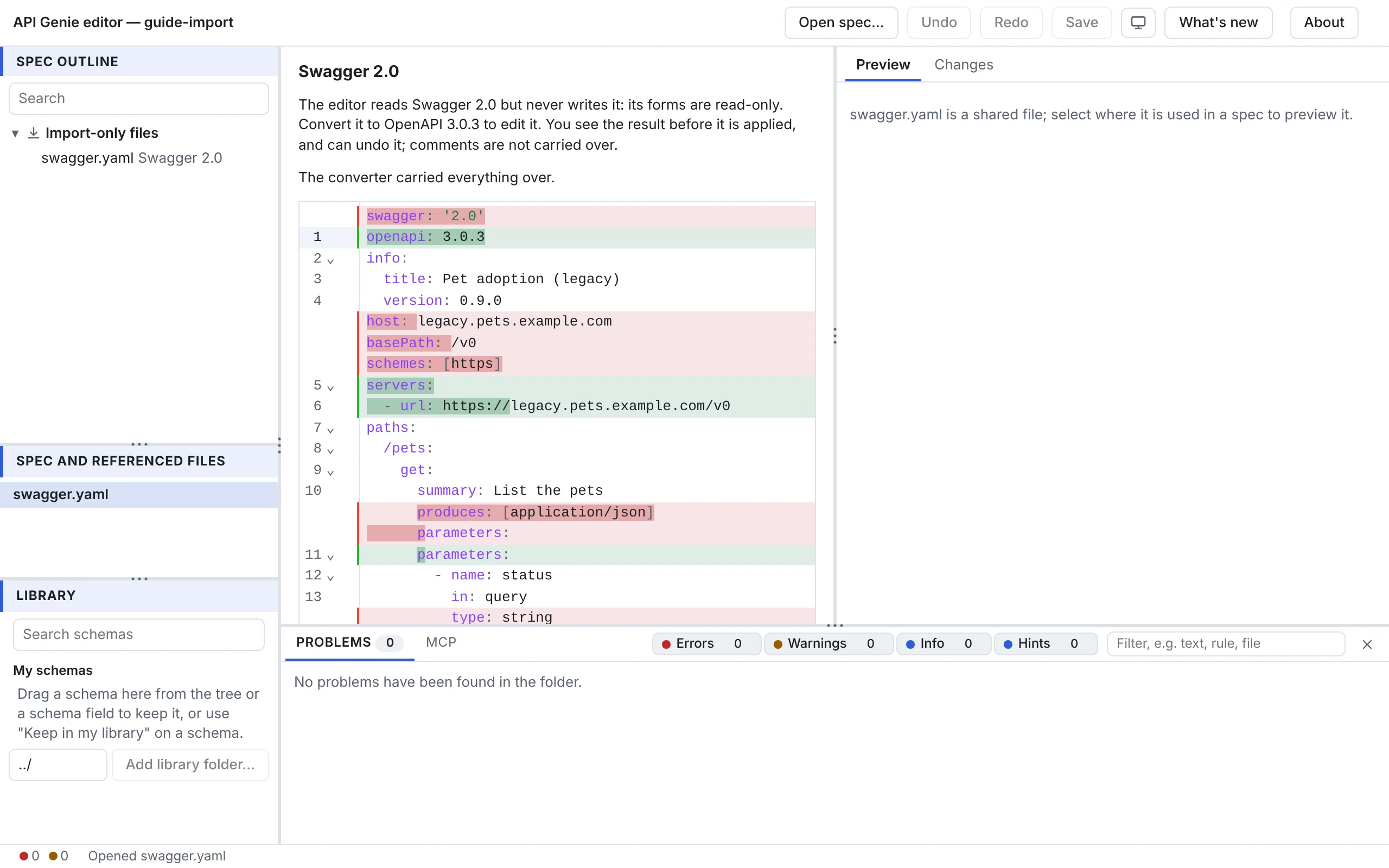
Open a Swagger 2.0 document, an AsyncAPI 2.x document or a Postman collection with Open spec…, as you would a spec. The editor reads it but never writes it: the tree lists it under Import-only files, with its format, and the form pane offers the conversion instead of forms. Press Convert to OpenAPI 3.0.3… or Convert to AsyncAPI 3.0.0….
The panel then shows what the converter could not carry over, each item with the path in the
source, or The converter carried everything over, and the diff between the file as it is and
the converted text. A Swagger or AsyncAPI 2.x file is converted in place; a Postman collection
becomes a new file next to it, named like calls.openapi.json, and the panel says so.
Apply the conversion replaces the text, or creates the file, as one undoable step; Cancel
leaves the file as it was. Comments are not carried over. The status bar reminds you to save,
which writes the conversion to disk.
In VS Code, Show the conversion in the diff editor opens the diff in VS Code’s editor.
Save a copy
On the desktop, File › Save As… writes the current file anywhere on disk, under any name; a copy saved inside the spec’s folder joins the open files. In the web editor and in VS Code, use the browser’s download or VS Code’s File › Save As….
Export a bundle
Export bundled in the toolbar writes the selected OpenAPI spec and every file its references
reach into one document, as apigenie bundle does, named <name>.bundled.yaml or .json after
the spec. The web editor and the desktop app save it as a download; VS Code asks where to save
it. The open files stay as they are.
Next
The Library keeps schemas you reuse across specs.
apigenie bundle in the reference says what a bundle keeps and
inlines.